
Blogs, Product Installation Guide
SPIIT13 Communication Module |Wuhan Yuli Automation
Dec
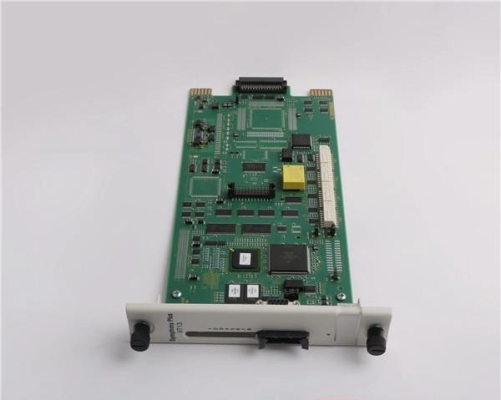
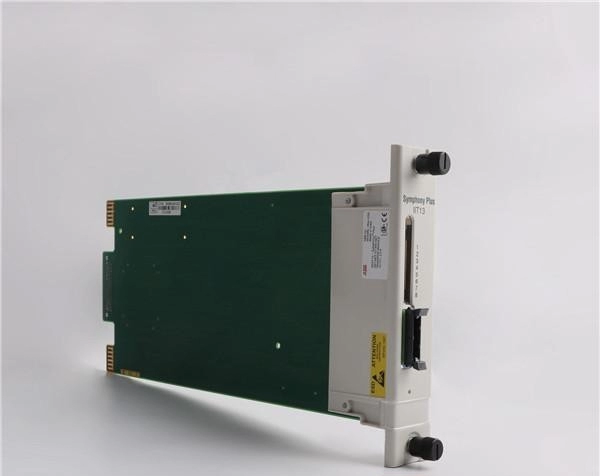
Introduction to SPIIT13 Communication Module
The SPIIT13 communication module is a crucial component in modern industrial automation systems. It ensures reliable data transfer between controllers, field devices, and control networks. Proper installation and commissioning of this module guarantee optimal performance, reduce errors, and extend system lifespan. This guide provides a detailed step-by-step process, best practices, and troubleshooting strategies for SPIIT13, aiming to make the deployment smooth and efficient.
Preparing for Installation
Before beginning installation, it is essential to review safety precautions, check module specifications, and prepare the necessary tools. Ensure the working environment is clean and free from dust, moisture, or any electrical interference. Verify that the cabinet and control system are powered down to avoid electrical hazards. Gathering all required cables, connectors, and documentation beforehand streamlines the installation process and minimizes delays.
Module Inspection
Upon receiving the SPIIT13 module, inspect it carefully for physical damage. Check for bent pins, broken connectors, or loose components. Confirm that the module matches the system specifications and firmware requirements. Additionally, verify that all accessories, such as mounting brackets and screws, are included. Early inspection prevents installation errors and ensures that the module will operate correctly once installed.
Installation Procedure
Mounting the Module
Secure the SPIIT13 module to the designated slot in the control cabinet. Use the provided mounting hardware to ensure a stable and vibration-free installation. Confirm that the module aligns correctly with the bus connectors and that no gaps exist between the module and the backplane.
Connecting Power and Communication Interfaces
Connect the power supply according to the system’s electrical diagram. Ensure correct polarity and voltage levels. Next, attach the communication cables to the designated ports. Verify that connectors are firmly seated and that no loose connections can cause signal loss. Proper connection is critical for reliable data transmission and system integrity.
System Integration
Once physically installed, integrate the SPIIT13 module into the control system. Update the controller configuration to recognize the new module. Assign proper network addresses, communication protocols, and parameters according to system requirements. Test the connection between the module and the controller to confirm seamless data exchange.
Commissioning and Testing
Initial Power-On
Gradually power on the control system, monitoring for any abnormal behavior or error indicators. Check LED status lights on the SPIIT13 module to verify operational readiness. A green LED typically indicates proper functioning, while red or blinking LEDs may signal connection issues or faults.
Communication Verification
Use diagnostic software or built-in system tools to verify communication integrity. Conduct tests by sending sample data between the SPIIT13 module and connected devices. Confirm that all data packets are received accurately and without delays. Troubleshoot any detected errors immediately to prevent downstream system problems.
Functional Testing
Simulate real operational conditions to assess module performance. Monitor the system for latency, data integrity, and error rates. Adjust configuration parameters if necessary to optimize communication speed and reliability. Document all testing procedures and results for future reference and maintenance purposes.
Troubleshooting Common Issues
Despite careful installation, communication issues may arise. Typical problems include loose connections, incorrect configuration settings, or interference from other devices. Begin troubleshooting by checking physical connections and verifying cable integrity. Next, review the system configuration and firmware versions. Use diagnostic tools to isolate faults and implement corrective actions. Following a systematic approach reduces downtime and ensures long-term system stability.
Maintenance and Best Practices
Regular maintenance prolongs the life of the SPIIT13 module and ensures continuous optimal performance. Inspect the module periodically for dust accumulation, loose connections, and firmware updates. Keep a maintenance log, noting any configuration changes or error occurrences. Additionally, avoid exposing the module to extreme temperatures, moisture, or strong electromagnetic interference. Adhering to best practices reduces unexpected failures and enhances overall system reliability.
Conclusion
Installing and commissioning the SPIIT13 communication module requires careful preparation, precise execution, and systematic testing. By following this guide, industrial operators can achieve seamless integration, reliable data communication, and efficient system performance. Proper maintenance and periodic verification further ensure that the SPIIT13 module continues to operate at peak efficiency, supporting critical industrial automation processes for years.
