
Blogs, Product Installation Guide
ABB Module SPDSI13 Maintenance and Troubleshooting Guide
Dec
ABB Module SPDSI13 Maintenance and Troubleshooting Guide
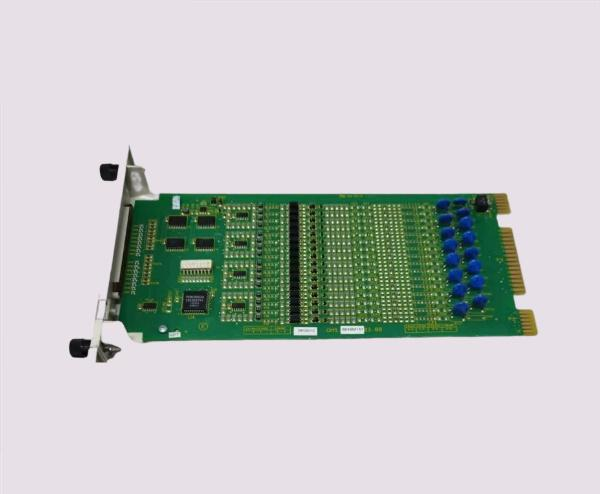
The ABB SPDSI13 module is an essential component in industrial automation systems, providing reliable communication and signal processing between controllers and connected devices. Proper maintenance and timely troubleshooting are critical for ensuring consistent performance, minimizing downtime, and extending the operational life of the module. This guide provides detailed insights into the module’s functionality, recommended maintenance practices, common issues, and effective troubleshooting techniques.
Overview of ABB SPDSI13 Module
The SPDSI13 module supports multiple digital and analog signals, offering fast, accurate data processing within ABB automation networks. Its modular design allows seamless integration with other ABB modules and PLCs, ensuring flexibility and scalability in various industrial applications. Key features include:
-
High-speed signal processing for industrial automation
-
Modular design for easy installation and replacement
-
Durable construction suitable for challenging industrial environments
-
Full compatibility with ABB PLCs and automation networks
Understanding the module’s architecture and capabilities is the first step in effective maintenance and troubleshooting.
Routine Maintenance Practices
Maintaining the ABB SPDSI13 module regularly helps prevent failures and ensures optimal performance. Recommended practices include:
-
Visual Inspections: Check for physical damage, dust accumulation, corrosion, or discoloration.
-
Connector and Cable Verification: Ensure all connections are tight and free from damage.
-
Environmental Monitoring: Maintain optimal temperature, humidity, and airflow to prevent overheating or moisture damage.
-
Firmware Updates: Regularly update module firmware to enhance functionality and maintain compatibility.
-
Cleaning: Remove dust and debris using soft brushes or compressed air, avoiding direct contact with sensitive components.
Following these practices reduces unexpected failures and maintains the module’s reliability.
Common Issues and Their Causes
Even with routine maintenance, the SPDSI13 module may encounter several common issues:
-
Communication Errors: Often caused by loose connections, incorrect module addressing, or network interference.
-
Signal Delays or Loss: May result from damaged cables, faulty connectors, or environmental factors like vibration.
-
Module Malfunction: Can occur due to firmware bugs, electrical surges, or overheating.
-
Power Supply Problems: Unstable or incorrect voltage may impact module performance and connected devices.
Prompt identification of the root cause is essential to minimize downtime and prevent further system disruption.
Step-by-Step Troubleshooting
A structured troubleshooting approach ensures efficient diagnosis and resolution of SPDSI13 module issues:
-
Physical Examination: Inspect the module for visible damage, burnt components, or loose connectors.
-
Power Supply Verification: Confirm that the input voltage meets module specifications and is stable.
-
Connectivity Testing: Check all network cables, connectors, and I/O channels for proper operation.
-
Firmware and Configuration Check: Ensure the module’s firmware is updated and configuration settings are correct.
-
Functional Testing: Conduct input/output testing to verify correct module behavior.
-
Component Replacement: Replace defective cables, connectors, or the module itself with certified ABB parts if necessary.
This systematic approach helps ensure fast and accurate problem resolution.
Safety Precautions
When performing maintenance or troubleshooting on the ABB SPDSI13 module, safety is paramount:
-
Always disconnect power before servicing the module.
-
Use personal protective equipment (PPE) as required.
-
Implement grounding or ESD protection to prevent static damage.
-
Avoid touching sensitive components or connectors with bare hands.
Adhering to these precautions protects personnel and prevents damage to the module.
Advanced Maintenance Tips
To maximize the reliability and lifespan of the SPDSI13 module, consider the following strategies:
-
Scheduled Diagnostics: Regularly monitor module performance using ABB diagnostic tools.
-
Spare Parts Inventory: Keep essential modules, connectors, and cables ready for quick replacement.
-
Maintenance Records: Document inspections, repairs, and firmware updates to facilitate predictive maintenance.
-
Staff Training: Ensure technicians are trained in module architecture, troubleshooting procedures, and ABB network integration.
Proactive maintenance reduces unexpected failures and ensures smooth industrial operations.
Conclusion
The ABB SPDSI13 module is a reliable and high-performance component in industrial automation systems. Regular maintenance, proper troubleshooting, and adherence to safety protocols ensure optimal performance, minimize downtime, and extend the module’s lifespan. Following best practices allows engineers and technicians to maintain system reliability and operational efficiency while safeguarding industrial processes.
